

Download Stupeflix Studio – free online video editing tool for Windows, Mac, Android & iOS
Overview
Stupeflix Studio is a cloud‑based video editor that lets anyone create polished videos and multimedia slideshows without installing heavy software. Designed for beginners and casual creators, the platform combines an intuitive drag‑and‑drop interface with a library of pre‑made editing styles, royalty‑free music tracks, and direct sharing options to YouTube, Facebook, Instagram and more. Because it runs in a web browser, Stupeflix Studio works on Windows, macOS, Linux, Android and iOS devices, making it a truly cross‑platform solution.
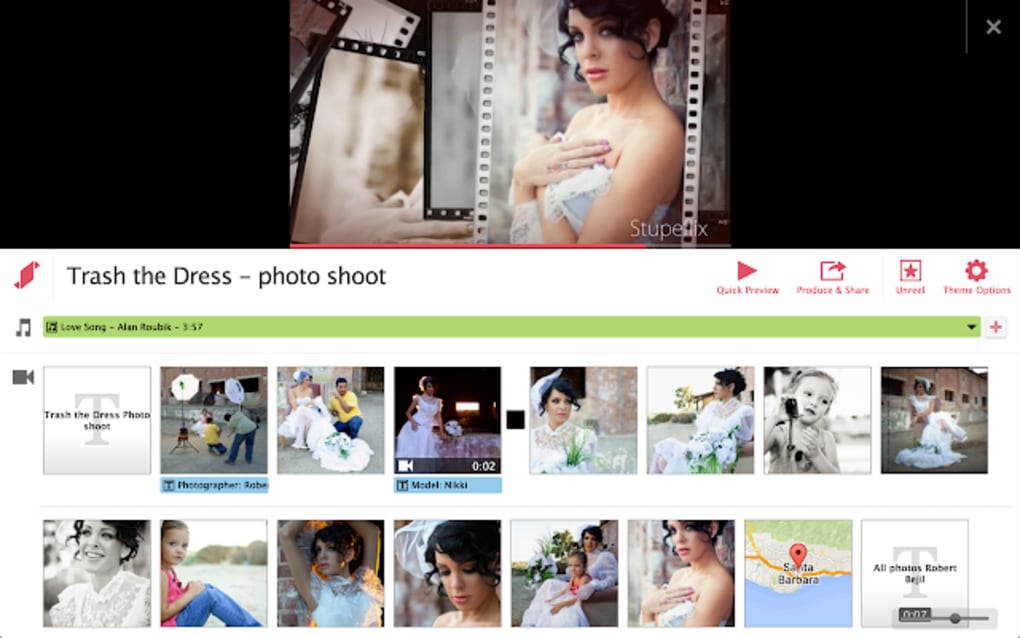
Users can import media from local storage, Dropbox, Google Drive, Flickr, Facebook or Instagram, then arrange clips, photos, maps, text and music into a single timeline. With 16 built‑in editing styles, automatic transitions, and dynamic volume control, the app delivers professional‑looking results in just a few clicks. The free version imposes a 20‑minute video limit, but there are no watermarks and the output can be exported in SD or HD 720p.
Whether you need a quick social‑media teaser, a family slideshow, or a simple promotional clip, Stupeflix Studio provides a secure, fast, and cost‑free way to turn raw footage into share‑ready content.
Key Features
- Online, no‑install editor – works in any modern browser.
- 16 ready‑made editing styles that apply transitions, titles and effects automatically.
- Drag‑and‑drop media import from PC, cloud services (Dropbox, Google Drive, Flickr) and social platforms (Facebook, Instagram).
- Built‑in library of 350 royalty‑free music tracks plus ability to upload your own audio.
- Dynamic music volume management that fades background music when video audio is present.
- Basic editing tools: trim, split, reverse, speed adjustment, and custom duration for photos, text slides and maps.
- Export options in SD or HD 720p, with direct publishing to YouTube, Facebook, Vimeo and other networks.
- Embeddable video code for blogs, websites or LMS platforms.
- Free tier with up to 20 minutes of final video length; no watermarks.
- Secure HTTPS connection and GDPR‑compliant data handling.
Installation & Usage Instructions
Getting started with Stupeflix Studio is as simple as opening a web page. Follow these steps to create your first video:
- Visit the website: Go to Stupeflix Studio and click the bright “Make a Video” button.
- Create an account (optional): While you can work as a guest, registering saves your projects in the cloud for later editing.
- Import media: Use the “Add Media” panel to upload files from your computer or connect to Dropbox, Google Drive, Flickr, Facebook or Instagram. Supported formats include MP4, MOV, AVI, JPG, PNG, and GIF.
- Arrange the timeline: Drag each clip, photo, map or text box onto the storyboard at the bottom of the screen. Adjust the duration by dragging the edges or typing a precise number of seconds.
- Select an editing style: Choose one of the 16 styles (e.g., “Cinematic”, “Travel”, “Corporate”) to automatically apply transitions, lower‑thirds and title animations.
- Add music: Browse the built‑in library or upload your own track. The app will sync the beat with scene changes and automatically lower the volume when spoken audio appears.
- Fine‑tune: Use the toolbar to trim unwanted parts, split a clip, reverse playback, or change speed for slow‑motion effects.
- Preview: Click the “Play” button to watch a real‑time preview. Make any needed adjustments before final export.
- Export & share: Choose SD or HD 720p, then click “Export”. You can download the file, copy an embed code, or publish directly to YouTube, Facebook or Vimeo.
Because the editor runs entirely in the cloud, there are no updates to install. The platform is continuously refreshed on the server side, so you always have the latest features and security patches without any manual effort.
Compatibility, Pros & Cons
Stupeflix Studio is a web‑based application, which means it works on any device that supports a modern browser (Chrome, Firefox, Edge, Safari). Whether you are on Windows 10/11, macOS 12+, Linux, Android 9+ or iOS 13+, you can launch the editor without downloading an installer. The only requirement is an active internet connection for uploading media and rendering the final video on Stupeflix’s servers.
Pros
- Completely free for videos up to 20 minutes, with no watermark.
- Zero‑installation – runs in any browser.
- Intuitive drag‑and‑drop workflow perfect for beginners.
- Wide range of pre‑made styles saves time on creative decisions.
- Robust music library and automatic audio syncing.
- Direct sharing to major social platforms and embed code generation.
- Secure HTTPS connection and GDPR compliance.
Cons
- Maximum video length limited to 20 minutes in the free tier.
- Advanced effects (color grading, multi‑track audio) are not available.
- Rendering depends on internet speed; slower connections may delay export.
- No offline mode – you must stay online to edit and export.
- Limited resolution options (SD or 720p HD only).
Frequently Asked Questions
Is Stupeflix Studio really free?
Yes. The basic version allows you to create and export videos up to 20 minutes long without any watermarks or subscription fees. Premium plans are available for longer videos and higher resolutions.
Do I need to install any software?
No. Stupeflix Studio runs entirely in your web browser, so there is nothing to download or install. Just open the site, sign in, and start editing.
Can I edit videos on my mobile device?
Absolutely. The editor is responsive and works on Android and iOS browsers. All features available on desktop are accessible on mobile, though the screen size may affect how you arrange timeline items.
What video formats does Stupeflix support?
Common formats such as MP4, MOV, AVI, and WMV are supported for import. Exported videos are delivered in MP4 (H.264) format, compatible with virtually every platform.
Is my data safe when I upload media to Stupeflix?
Stupeflix uses SSL encryption for all file transfers and stores media on secure servers that comply with GDPR. Files are automatically deleted after the project is exported, unless you choose to keep them in your account.
Conclusion & Call to Action
Stupeflix Studio delivers a surprisingly powerful editing experience for a free, browser‑based tool. Its strength lies in the balance between simplicity and creativity: novices can generate sleek videos in minutes, while more experienced users still have access to essential trimming, speed control and custom music options. The 20‑minute limit is a modest restriction for most social‑media creators, and the lack of a desktop client means you’re never tied to a specific operating system. If you need a quick, secure way to turn photos, clips, and maps into share‑ready videos without learning complex software, Stupeflix Studio is an excellent choice. Download Stupeflix Studio today, start a new project, and bring your story to life in just a few clicks.



.png)



